




![Better MC [Forge]](/_astro/better-minecraft.cc1AHm3l_186uf1.webp)

How the panel works
One panel for every game
We build the client panel at panel.mistycloud.pl ourselves. The console and files work the same for every game, and the rest adapts to what runs on your server. The add-ons tab appears only where we have a source for add-ons, and in the settings you pick the runtime the game needs, such as a Java or .NET version.
A new game in our offer gets the same panel. No second account and no new tool to learn. The interface is in Polish and English.
Features
Day-to-day server work
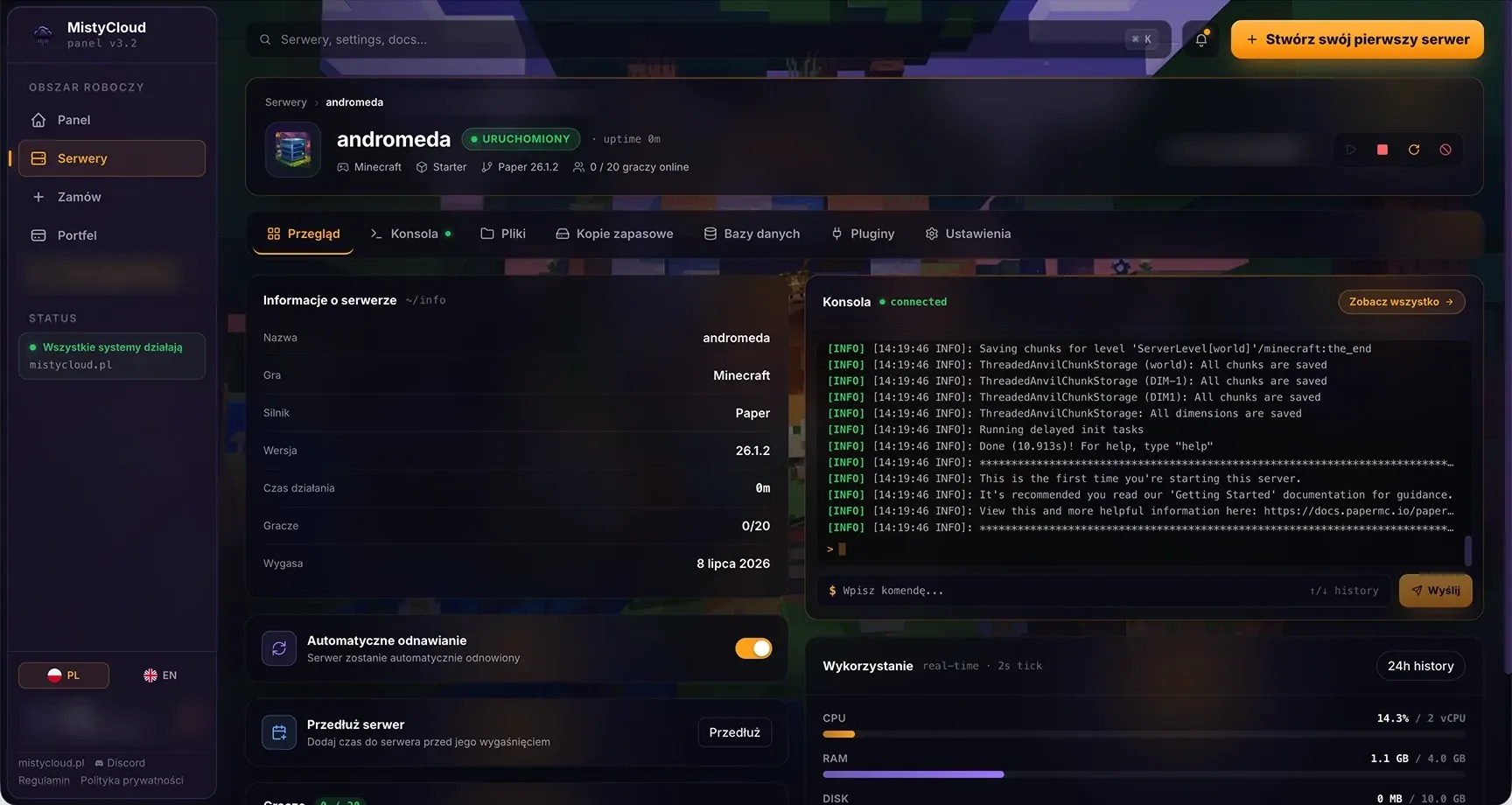
panel.mistycloud.pl
See the panel from the inside
Live console
Logs and commands in real time, with chat and debug filters, straight from your browser.
Files, editor and SFTP
A file manager with an editor, uploads from disk or URL, archives and permissions. Plus full SFTP access.
Add-on installer
Install plugins and mods from the panel with their dependencies, no manual uploads. The tab appears for games we have an add-on source for, currently Minecraft (Modrinth).
Version and engine switch
Change the game version, and for Minecraft also the engine or modpack, in the server settings. Before the switch the panel points you to your backups.
Backups
Create, download, lock against deletion and restore with one click, optionally wiping files before the restore.
Stats and quick actions
Live CPU, RAM, disk and network usage next to start, stop, restart and kill without opening the console.
Account and security
Log in with email or Discord. Protect the account with two-factor authentication and backup codes, and changing your password or email requires confirmation.
Email notifications
You choose what to hear about: server created and renewed, reminders 7, 3 and 1 day before expiry, suspension and reactivation.
Service status
A status tile in the panel shows the state of the infrastructure from status.mistycloud.pl. You know whether the problem is on our side before you write.
Virtual Wallet
You pay from a wallet, not with a card every time
You buy and extend servers from the Virtual Wallet. Top it up by card or Polish bank transfer through Stripe, the funds are available immediately, and we never store card data.
The transaction history has filters, a spending chart and CSV export. If you do not want to keep track of dates, turn on automatic renewal and the panel extends the server from the wallet.
Billing
Rules that do not change
- Payment
- all amounts include VAT
- Periods
- a month, a quarter, half a year; a longer period means a lower price
- Discount codes
- entered in the order summary
- Extension
- at any time, the time is added to the current expiry date
- Contract
- no fixed-term commitment; if you do not renew, the service expires
Server start
From sign-up to the first player
- 1
Account and wallet
Create an account in the panel and top up the wallet.
- 2
Order in five steps
The wizard takes you from choosing the game and plan to the summary. In the configuration step you set the game version, and for Minecraft also the engine or modpack.
- 3
The server installs itself
Once paid, the installation starts automatically. When it finishes, copy the server address and port from the panel and invite your players.